



This blog tutorial will show you how to add a custom signature to your posts! Adding a signature to your post is fun and easy. I think it makes your blog a little more personable too! The great thing about this code is it will add your signature to your older posts and your new ones!
Once you design your signature be sure to save it as a png. Pixlr.com is a good free program you can use to design a signature (click on ‘Open Pixlr editor’ and ‘Create a new image) . Once you save it upload it to a free image hosting site. I like to use Image Shack.
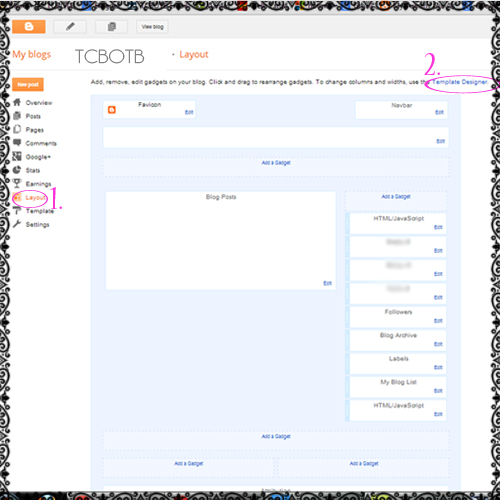
1.) When you are on your ‘Layout’ page click on ‘Template Designer’.
2.) Click on ‘Advanced’ and then ‘Add CSS’. You will want to paste this code in the box:
.entry-content:after {
content: url(INSERT-YOUR-IMAGE-URL-HERE);
margin-left: 200px;
}
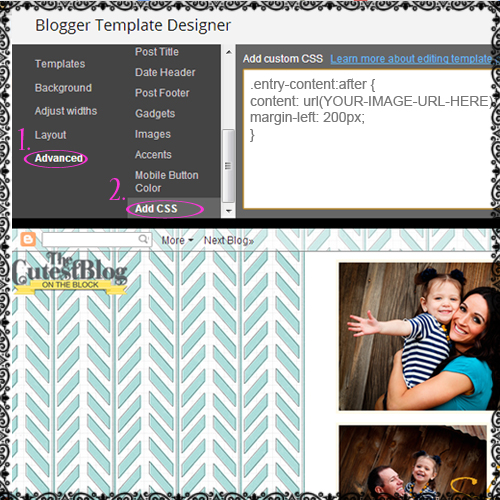
4.) Replace the ‘INSERT-YOUR-IMAGE-URL-HERE’ with the url of your signature you uploaded to your image hosting site. You can also change the number 200 to be higher or lower depending on if you want your signature aligned left or centered. After you are happy with the placement of your signature, click on ‘Apply to Blog’ in your upper right hand corner.
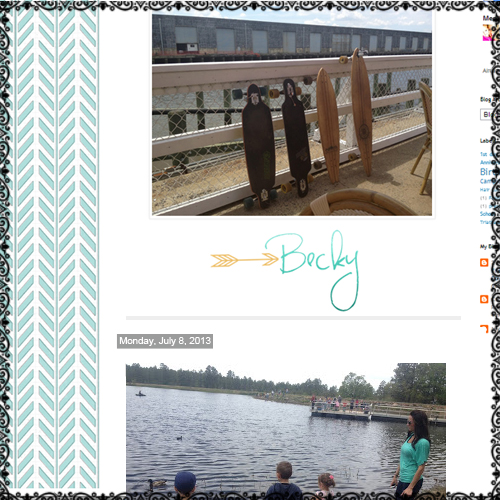
This is the finished look after I applied my custom signature!
For more signature ideas take a look at these! You can have our custom design team design a signature for you!!

Just wish to say your article is as surprising. The
clearness in your post is just nice and i could assume you
are an expert on this subject. Well with your permission let me to grab your feed to keep updated
with forthcoming post. Thanks a million and please keep up the
rewarding work.
Thanks Christel!
Hi,
I followed all the steps but nothing shows up when I make a new post.
Do you have any suggestions as to what may be happening?
Thanks,
Cheri
Hi Cheri! The code has been fixed, sorry about that! Try it again:)
I did all of the steps but at the end, once I saved the changes, under the box it says, “Your HTML cannot be accepted: Tag is broken: IMAGEALT=”POST” …. And ideas as to why? I’m not too great with all this code stuff unfortunately.
Hi Abigail! Try it again, the code has been fixed;)!
the signature doesn’t show up :(
Hi Sasha! Try it again….we were having problems with the code displaying correctly! It is fixed now:)
yayyy it works. thanks so much
Hey, it’s me again. Um, I saved the sign as png, it still has that white background/outline.
the outline shows up on mine as well, any ideas how to get it off?
If the border is showing up around your signature then it sounds like you need to change your border color to transparent. To do this go to your ‘Layout’ page and click on ‘Template Designer’. Then hit ‘Advanced’ and find ‘Border Color’. Highlight the color box with the drop down and mark the box that says ‘transparent’. Be sure to click ‘Apply to Blog’. Let me know how it turns out!! —Becky
nothing is showing up when i follow your instructions… :(
Hi Erica…did you do a new post yet? It won’t show up on old posts, just the new ones. –Becky
My signature is coming up as “blog signature”. I’m not 100% I used the correct imageshack link…
Hi Ashley! Just make sure you use the Direct Link code for the signature. –Becky
Hello. First of all, I thank you for all your freebies and tutorials. Today I decided to create a signature into my blog posts. I followed your instructions to the letter, created a .png file in photoshop, uploaded this to Flickr. I used the code above: , replacing signature with direct link to my file on flickr. I have tried several test pages and only get a broken link to my signature file.
Any chance you have having trouble with the code again?
Thanks for your help!
Hi StephH! We aren’t having any problems with the code…sorry! I’m not sure why it won’t show up for you. I’ll email you and see what I can do to help:) —Becky
This blog is great and I am soo happy that I finally got to customize my blog to my liking. The steps are pretty easy and it was hard to figure out my way. Thank you so much xoxo Tara
Thanks Tara!! I’m so glad it turned out good!! —Becky
Thank you a lot for sharing this with all of us you actually recognize what you’re speaking about! Bookmarked.
I LOVE your site!!! I followed your instructions and my signature defaults to the top right, before the body of my posts. Is there any way to set it to show after posts? Thanks so much. -Kathryn
Hi Kathryn, when you go into your post just be sure to start typing before you signature. You can drag the signature to the bottom of your post. Hope this helps:)
I can’t get my signature to work. I’ve followed all the steps….but what exactly is a direct link? In Image shack there is a code for forums, code dor websites and code for email. I have tried all of them and still signature does not work. Am I supposed to look somewhere else for the direct code? Please assist. Thank you.
Marie, when you upload your signature image to image shack you will see a few codes. You want the code next to the box that says ‘direct link’. The other codes won’t work:)
Hi, my name is showing up, but the its at the top of my post and I cannot move it… HELP PLEASE :)
Hi Emily, when you go in to do a new post just drag the signature image down to the bottom of the post. On future posts just be sure to always start typing above the signature image.
The signature didn’t apear :( I did everything said and it just didn’t show up! Any suggestions?
Thx :)
Jane
Hi Jane, when you did a new post did it show up on the new post? Was there any error codes? –Becky
THANK YOU SO MUCH!! I’ve been looking around forever for a way to add a cute signature on my blog, and your tutorial is by far the simplest, most clear, concise, and to the point one I’ve seen yet! I’m going to set it up tonight! I’ve been perusing your blog in general, and you ladies run a fabulous blog! definitely in my bookmarks menu! :) xoxo
Thanks Melissa! You just made my day:)! I’m so glad you like the tutorial! –Becky
It just came to my mind to add a signature, so I searched for this and come to know that how easy it is. its just easy because the peoples like you.
thanks a lot
Neha
https://beautitipscollection.blogspot.com
Thanks so much for the great tutorial! Easy to follow – used it on both blogs.
Thanks for the tutorial! But what site did you use to create you signature, and how did you put an image beside the signature.
Thanks! :)
hello Emily,
We use photoshop. You can use https://pixlr.com/. It’s really easy and user friendly. :)
Hello! Thanks this is very useful! But, if I am only a writer on a blog how can I add my signature?
Hello Deea,
If you are only a contributor on a blog, you can create your own signature image still, and then just upload it individually under each blog post you do. It takes a little extra time, but there you have it!
Ashley
Thank you so much! Super helpful!
For some reason, Blogger will not let me drag my signature down to the bottom of the post. It also won’t allow me to type before the signature either. Not sure if this is bc of the new interface or what. Any suggestions?
:)
Hi Sara,
It looks like you have figured out the answer to your question. I looked at your blog and your signature looks great!
Thanks,
Ashley – TCBOTB
Yay!!! Thanks so much!! I can’t wait to blog something to show off my new signature! Now on to figure out how to add a facebook like, twitter tweet and pinterest buttons!!
Thanks carol!!
I simply want to tell you that I’m new to blogs and seriously liked you’re website. Almost certainly I’m likely to bookmark your site . You certainly have fabulous writings. With thanks for sharing your web page.
Thank you for these tutorials! Anytime I have a question about a blog how-to, I know where to go! I use these tutorials all the time!
Your website is the best! thanks for all your help.
What website do you recommend using for signature hosting. I love the tutorial and how easy it is to add a signature, but my problem is where to go to make one in the first place? Where did you make yours?
Hi Serene! A free program to make your signature in is Pixlr.com. Then you can host it on imageshack.com (also free)! Let me know how it turns out! –Becky
Wow! Excellent. I’m looking through the rest of your tutorials now as I am a new blogger and am trying to figure everything out. Thanks a bunch!!
Great tutorial! Worked perfectly. Only problem is that when my signature is posted, a thin black box appears around it, like a border. Any ideas?
Hey Lauren! To remove the border around your signature try this: Go to your ‘layout’ page adn then ‘template designer’. Then click on ‘Advanced’. Find the option for ‘Border Color’. Make sure you mark transparent and then click ‘Apply to Blog’. Let me know how it turns out:)! —Becky
Short, clear and to the point. I don’t think I’ve ever read such a straightforward, no-fuss tutorial! I am now inspired to create a signature.
Hi. First of all, I just wanted to say thank you for making your tutorials so easy. I had a question about this one though. I did as you said with adding a signature but it shows up before the body of my post. Not at the end. Is there a way to fix that?
Hi Meghan, yes there is a way to fix it. You will just want to do your post like normal then when you are finished you can click on the signature and drag it to the bottom of the post. Hope this helps:)
hey! i read your tutorial and thought it was very simple, buttt when i went to make my signauture, i got on microsoft word starter and tried saving it 10 times, then went to upload it onto my photobucket. i cant find it in my photobucket anywhere. i saved it as lots of diff things and it wont show up when i wanna upload.. didnt know if you could help with this or not?! thanks~
Hey Stevie, you may want to try uploading it to imageshack …let me know how it turns out! —Becky
I dont usual comment, but that was a great
post. cheers!
Wow you have done it once more. Some wonderful info here. You have made me break my comment
embargo, cheers :)
HI I have a question, where should i place my singature? How do i even make one to put it on my blog????????????????????????????????
Hi Jenna, you can make one in pixlr.com or any other photo editing program. When you apply the code it will place the signature before your post. You will probably want to drag it down to the bottom of your post:) —Becky
Can this be used for sqarespace?
Hi Sharon, I’m not familiar with the html on squarespace. Sorry! —Becky
Thank you, you guys are awesome!
Thank you so much for the tutorial! It works great. I tried a different one from another site with no luck. Thanks for your amazing site!
Thank you so much for the tutorial! It worked perfectly. You have such a wonderful site!
Hello,
I followed the steps but it shows the link instead of the signature:(
Hi Cristina, make sure you insert the direct link into the signature code and it should show up:) —Becky
Nice tutorial.. Thanks for your sharing admin.. I wait your next useful post.. :)
This is a great site. I love this idea, but what is a great website for making a signature? I cannot find a reliable one. Help!
Hi Adrienne, you can go to https://pixlr.com/editor/ and choose the option to create a new image!! It is an easy and free program to design your signature:)!! —Becky
thanks its work for me
.
Thank you so much. I made my signature, and now my blog looks great! For any of those who want to check it out, go to lifeisbeautiful15.blogspot.com Thanks!!!!!!
Works perfectly. Thanks!
How do you make a signature? Do you purchase them? If so – where at ? :)
Hi Jessica! CUTE blog! You can purchase a signature from our custom design site, https://www.thecutestblogontheblockcustomdesign.com/p/packages.html Or if you have a photo editing program you can make your own. Pixlr.com is a free site that would work:) —Becky, TCBOTB
Great tutorial. Been searching the web and tried many different approaches. Did`nt get it to work, before I tried your tutorial.
Wish all tutorials was as easy and intuitiv as yours were.
Thanks=)
Hi Megan, make sure you copied the entire code….we haven’t had any problems with it! It sounds like you are doing it right too:)!! —Becky TCBOTB
Thank you everyone for your comments!! As of September 2013 we updated this tutorial on how to add a signature to your blog!! Have a great day!
Becky & Ashley
Super it works, thank you
I LOVE your site!!!