


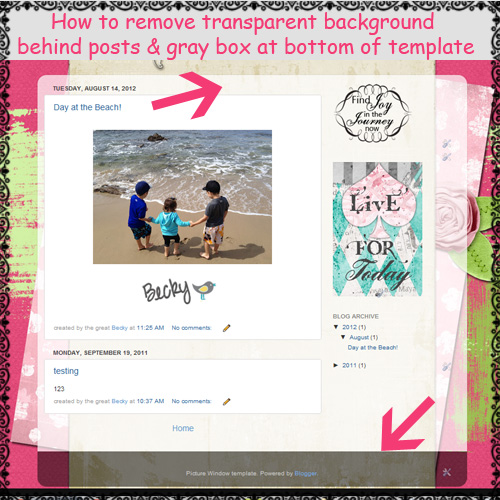
Do you have the new Picture Window template? If so you probably have a transparent box in the center that covers your cute background! You will find out in this easy tutorial how to remove that opaque background behind your blog post!
Before:
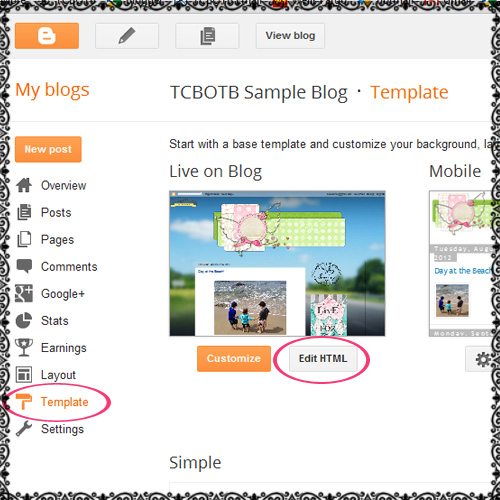
1.) Go to your ‘Template’ page and click on ‘Edit HTML’ and ‘Proceed’.
2.) Click on the box next to Expand Widget Template. Hit Ctl F to bring up a search box. Insert these words into the search box: “main.background” It will bring you to this code:
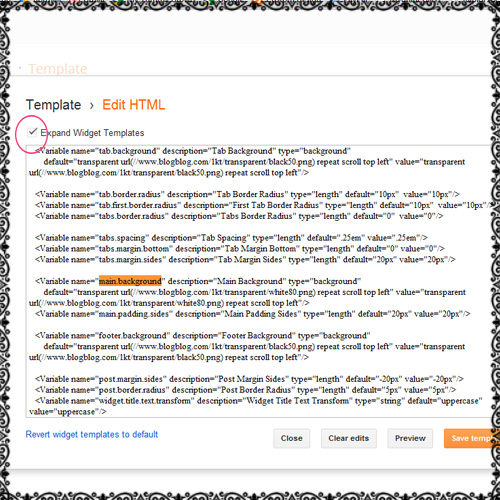
Highlight the code on your blog that looks like this:
<Variable name="main.background" description="Main Background" type="background"

default="transparent url(https://www.blogblog.com/1kt/transparent/white80.png)repeat scroll top left" value="transparent url(https://www.blogblog.com/1kt/transparent/white80.png) repeat scroll top left"/>

<Variable name="main.padding.sides" description="Main Padding Sides" type="length" default="20px" value="20px"/>
Replace the code you just highlighted with the code below.
<Variable name="main.background" description="Main Background" type="background"

default="transparent url() repeat scroll top left" value="transparent url() repeat scroll top left"/>

<Variable name="main.padding.sides" description="Main Padding Sides" type="length" default="20px" value="20px"/>
Once you do that click preview and if it looks good save! Your transparent background will now be gone!
-To remove the gray box at the bottom of your blog, follow this tutorial.
-You will notice there is still a white box behind every post. To remove the white box that is behind all your posts, follow this tutorial.
-To remove the border that is around all your posts, follow this tutorial.
-To adjust the width of your posts and sidebars so they don’t hang off the center part of your background, follow this tutorial.
Thanks for stopping by!! Leave a comment and let us know how your blog turned out:)!
Have tried the code for removing that awful gray background from my Blog and its coming up with an error code. No matter whether I’m in the old or new interface etc, its the same. It’s not working…wahhh!
Hey Heidi! We are working on fixing that part of the code…sorry! I’ll keep you posted;) –Becky
Hi. I love your tutorials and have been following them for some time now. I just tried your tutorial and everything worked except the footer portion. I’m not exactly sure why, but I followed everything else to a T. Any advice would be greatly appreciated.
Thanks,
Nicole
Hi Nicole! Sorry about that! Someone else mentioned it did not work for them either. I will look into the code and update it. I’ll keep everyone posted!
–Becky
Sorry, step 3 rather ;)
Hi Amanda! Sorry about that, it has been fixed;) –Becky
Hey Everyone!! The tutorial has been update:)! You can find out how to remove the gray box at the bottom of your blog here:
https://thecutestblogontheblock.com/tutorials/remove-gray-box-bottom-blog-updated-aug-2012
I must be crazy … I can’t find “main.background” anywhere and I’m hating that transparent border around my blog!!!!
What could I be doing wrong????
Diane, are you using the picture window template? Also, did you type in main.background into the search box?
Worked perfectly! thank you!….now if I can just figure out why my transparent png background header is not transparent, but white…I would be a happy camper!
Judith, your blog looks great!! Looks like you figured out your banner image:)! –Becky
hi can you help me,there is that gray thing around my banner picture which I can’t remove …I tried with adding css codes but I only menage to center my picture and title…pleas help
Hi Anime,
I think you may be using the wrong template and that’s why you’re getting the gray bar. Try the simple template or picture window.
Hi, I’ve tried multiple times to do this and to take off the white boxes and neither has been working. I’m sure I’m using the right background (picture window)? As of last night, I can’t figure any way to get back to the Minima template, but PW is driving me NUTS. I just wish I could have my old basic Minima back, but even if I copy and past the old code that I downloaded I can’t change font colors, ect. so I guess I’m stuck with this! Thanks for your help!
Hi. is there a way to remove the picture window back ground from your new background? i used one of the backgrounds on this site and now every time i press “Design”, it removes my new background and replaces it with picture window.
Hey Brittany! Your blog looks great…did you figure it out?
Um hi.. im new at this.. So i have a prob.. before i discovered ‘the cutedt blog’ I put a template.. And when I found a beautiful template in this blog.. I tried to replace it with the old one.. but when i edited the HTML/Java Script.. And all the instruction stated… It didn’t work.. What should I do now?
Hello Azalea, the background looks good on your blog! I’m not sure what you want to do with the template…..Are you wanting to use one of our free blogger templates and not the background that is currently on your blog? –Becky
I’m not sure what I’m doing wrong. I’m using the picture window template. And I used the instructions above. But the background isn’t showing up. I’ve tried a variety. So I know it’s not the code. But I just can’t get it to work. Can anyone help?
Hi Maria, everything looks good on your blog now…did you figure it out?
Hi there, I’m not sure where to ask this question. I am trying to use the Modern Spring 3 Col. Template for my blog, but the green background is not showing up. Everything else looks great, I just don’t know how to make the background work :) thank you!!! Leah
Hi Leah, the new template on your blog looks great! Did you still want to try to use the Modern Spring template? —Becky
Thanks so much for this works great for me. :)
I’ve been trying to remove the grey border but the code given brings up an error message. Is there something that I’m doing wrong or are you still trying to fix the code? Thanks for your help!!
Hey Erin! It looks like you fixed it, your blog looks good! Love the falling snow on your blog too:)! –Becky
I’ve been trying to remove the transparent box and used the code but its not working. what am i doing wrong?
Tyfaa, can you send a link to your blog and I’ll take a look? —Becky
I have tried to use your instructions twice now and nothings happens. What can I do?
Hi Jennifer, the transparent background is not on this blog. Is it on another blog? If so send a link so I can take a look:) —Becky
When I click ctrl F, nothing comes up. Where do I paste the stuff you are talking about?!!! it doesn’t make sense.
It isn’t working for me… :( Instead of removing the gray aria, it moves all the text a bit to the left, and the gray part is still there… Any suggestions?
Thanks in advance! ^_^
Hi Sophie,
Are you using the simple or picture window templates?
Thanks,
Ashley – TCBOTB