



This is my most favorite secret of all! We just updated the coding as of August 2012. It is now super EASY to apply the blog background you made! You can use almost any photo editing program to make your own backgrounds. I use Photoshop, but since that program can be a little pricey, there’s also programs like Gimp and Pixlr that are both free.
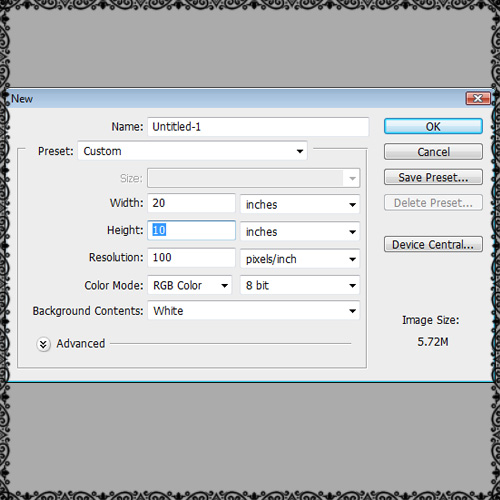
Start with a new screen and make sure the sizes are as follows:
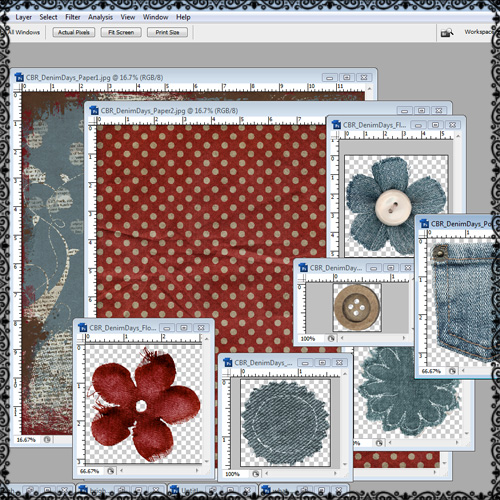
Next, open up all of the elements and papers that you plan to use with your background. There are lots of free digital scrapbook download website for you to find cute stuff on. One of my favorite sites is Digiscrapdepot. Remember, there are very strict piracy laws when using someone elses designs. You may only use these elements on your own blog. You may not redistribute these products in ANY way. Be sure to read their terms of use.
These are the elements and papers I will be using for my project today:
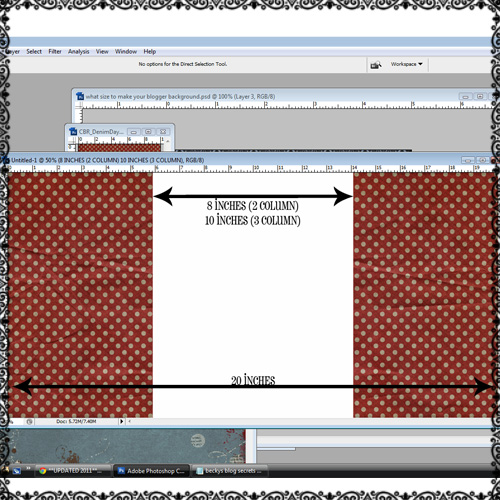
Next you need to arrange your papers on your background. Be sure to keep the follow measurements in mind when making your own blog background. Depening on your monitor size you can make the background larger. We do ours 20 inches wide and 10 inches deep. For your center post area you will need to make it 8 inches wide if you have a 2 column blog. If you have a 3 column blog do it 10 inches wide. The nice thing about making your own backgruond is you can play around with all the numbers to make it just the size you want:)!
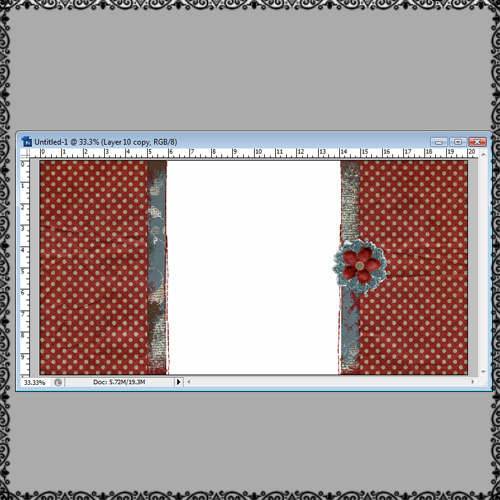
Add any fun elements to your project…this is the fun part! Play around with the colors, shadowing, sizes of everything. Decide which elements you want to pop and add a glow or shadow around them. Just be creative! Be sure to save your new background as a jpeg.
Below is my final background with the elements added:
This last step I will show you how to upload your cute background you made to your blog. You will need to upload your image to an image hosting site like imageshack. Be sure to check the box under the image you uploaded that says ‘Image resize’. Make sure the ‘Do not resize’ option is marked. Once you upload it copy the direct link and paste it into the code below where it says “INSERT DIRECT LINK HERE”. Be sure not to add any spaces and paste the code in between the parenthesis:
Now lets put this code on your blog! If you are logged onto your blog and viewing it then click ‘Design’ on the upper right hand corner.
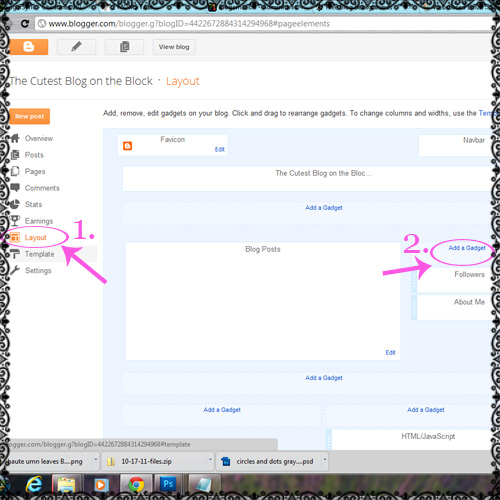
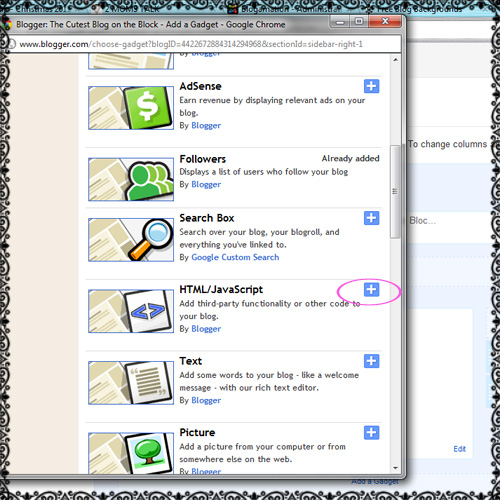
Now click on ‘Layout’ on the left hand column. Next click on ‘Add a Gadget’. Then click the plus sign next to Html/JavaScript. This is the box you will paste the above code in. Now click save and check out your new background designed by YOU!!
You can still spice up your blog by adding one of our free blog animations, buttons or blinkies to your sidebar. If you like this blog secret be sure to follow us on our Blog, Facebook and Twitter!
Hi there very cool web site!! Man .. Beautiful .. Amazing .. I’ll bookmark your site and take the feeds additionally?I’m glad to find so many useful information here within the put up, we’d like work out extra techniques on this regard, thanks for sharing. . . . . .
Thank you!
I’m totally excited! I’ve lagged on my blog lately, and these tutorials got me excited again. I made my own banner and love it. I also made my own background, but the code doesn’t seem to be working. Has it been working recently for people? Let me know if I’m missing something. I used ImageShack. Thank you!
Hey Becky! Are you still having issues with the background code…it has been working for other people. Just make sure you remove everything within the ( ) and replace it with your image shack code. —Becky
I simply want to say I’m newbie to blogs and actually loved your web blog. Very likely I’m planning to bookmark your blog post . You really have beneficial posts. Thanks a bunch for sharing your blog.
Thanks Tyson!
great stuff mate
Thank you!!
I’m extremely impressed with your writing skills and also with the format for your weblog. Is this a paid subject or did you customize it your self? Anyway stay up the excellent high quality writing, it is rare to look a nice weblog like this one these days..
Thanks so much…we love what we do. We’re glad you’re a part of it!
I’ve tried several times to add this to my page on blogspot.com but have been unsuccessful. The jpeg has been saved in photobucket and I’ve made sure to carefully copy and paste the direct link into your code inside the new html gadget. I’ve tried saving it at different sizes and formats and nothing seems to be working. Is there something I’m missing or maybe should try different? This is the link to access my background on photobucket if you would like to see: https://s814.photobucket.com/albums/zz65/aubreejeanne/?action=view¤t=SpencersBlogBackground.jpg
Thanks!
Hello Aubree, you may want to try image shack over photobucket. That site has worked better for us lately!
You guys rock my socks!!! I’ve loved your site for quite awhile now and this is even more icing on the cake. :-) Keep up the great work.
Thanks Michelle!!
It absolutely useful and it has helped me out loads. I hope to contribute & help other customers like its helped me. Great job.
Hey there, You have performed a great job. I will definitely digg it and in my view recommend to my friends. I am confident they will be benefited from this site.
How do I arrange the elements or rather add them on the background? They are separate I don’t know how to merge.
I tried this using both imageshack and picasa and had no luck :( Tried putting the gadget in several places. What am I doing wrong?
Hi Joy! Sorry we were having problems with the code displaying correctly on our site! It should work now…let me know how it turns out:) I like to use imageshack and be sure to copy the direct link to insert into our background code
–Becky
You made some clear points there. I did a search on the topic and found most individuals will agree with your site.
hiii [:)] i have a question! i use a background template of your blog. i really would like to make the background (the dark brown area, the content) a little bit lighter. i already did and upload the picture to my account but then the complete size of the background was different.. can you please help me? because its a little bit complicated to read some text on the dark background. i’m talking about this background:
“Flutter By 3 Column”
it would be great if you could help me! THANK YOU! greetings, doreen :)))
Hi Doreen! If you use the picture window template you will have a transparent image over the center of the dark brown area. Otherwise there is not a way to edit the background colors…sorry!
I have tried EVERYTHING that this post says and I cannot get my background to show up, any tips?
Hi Ashlie! Sorry we were having problems with the code displaying correctly on our site! It should work now…let me know how it turns out:) –Becky
I would like to use the ability of thanking you for the professional suggestions I have always enjoyed checking out your site. I will be seeking forward to the particular commencement of my school research and the whole preparation would never have been complete without coming over to this site.
I can’t get this to work. When I put it on my blog all the code actually appears on the side of my blog??? What am I doing wrong
Hi Kim! Sorry we were having problems with the code displaying correctly on our site! It should work now…let me know how it turns out:) –Becky
Thanks for the information, I realy like it.
my background is like super tiny, how come it isn’t covering the entire background?
nvm it’s working now :)
Hi Samantha! I’m glad it is working now:) –Becky
As a blogging novice, I’ve been relying on the generic Blogger backgrounds and formatting. In an attempt to help me branch out and make my blog more ‘me,’ my husband found this post. Now I have a unique, personalized background. Thank you! I will definitely be giving you props in a post!
Sarah! We are glad you found us! I just checked out your blog and it looks GREAT!! –Becky
I can’t get this to work to save my life…I just get the code on my blog :( How do I fix that? Thanks! I love your site and appreciate very much all the hard work you put into it!
Hello Jocelyn! Usually the code shows up on your blog if you are missing part of it or took part of it out. Make sure to just delete the words INSERT DIRECT LINK HERE and don’t add any spaces when you insert your Direct Link. Let me know if that helps:) –Becky
Yeah I did that (I am familiar with basics of coding lol) and I still can’t get it to work….ooft. I even used imageshack…hmmm…guess I will have to play around with it tonight and figure it out…
is there a certain a certain template I should be using or anything of the sort?
Excellent web site. Plenty of useful information here.
Hi! Great tutorial and thank you so much for posting! I just had a few questions similar to other people. I’m ready to put the design on my blog and I’m having no luck :/ I’m not putting any spaces in the coding, I am using the direct link with image shack, and the only aspects I am altering are the INSERT DIRECT LINK HERE words in replacement with my image link. Any advice? Thank you!
xx, Alexis
To my comment, I’d just like to add that when I save the html and preview my blog, my design is there, but only on the bottom half of the page.
Alexis, can you send me your blog address? It sounds like the size of the background might be off? Did you design it 20 x10 and 100dpi? –Becky
I just tried copying the code several times, but it’s not working. Well, it did appear in the middle of the page but in a small size, what should i do ?thanks
Hi Lenny, the code on our site won’t let you copy it? If the background you made did show up on your blog small, then you need to make sure the option is checked ‘do not resize’ in whatever program you hosted the background.
I simply want to say I am just beginner to blogging and definitely liked you’re blog site. Very likely I’m want to bookmark your blog post . You amazingly have perfect articles and reviews. Cheers for sharing your website.
Thanks Clair for checking out our site!!
I did everything as stated above and get nothing to show up. Is there a certain blogger background one must be using to get this to work? Thanks for any help you can give!!
Nevermind, I guess it was working but the file size was so big I had to have it resized so it would work. I used the 17inch monitor resize option on imageshack and now it seems to be perfect. Thx!
I’m glad it turned out Jenifer!
Hello. I’ve love your site for years and it has been pretty easy to follow the tutorials, they always work, but for some reason I’m having a hard time with this one. What template should I be using? Simple or Picture Window???
Hi Jackie. I like to use the picture window template. Then you just apply your background code to your ‘Layout’ page. When you apply the code does anything show up? Or is there an error code?
Hi! Thanks for the response. My backgrounds shows up but with a transparent screen in the middle — its from the picture template.
Jackie-now that your background is on your blog you will need to follow the tutorial on how to remove the transparent image in the middle of your screen. Then you will be able to see your cute background:)
https://thecutestblogontheblock.com/tutorials/new-how-to-remove-transparent-background-from-template-2
Hi! When I try to insert my work in the html box, saves, and enters my blog, it is too big for my blog. Your backgrounds en templates work perfectly, I just can’t seem to get mine rigt. And yes, I am making it the right sizes in photoshop.
Caecilie, it sounds like wherever you are hosting the background they are resizing it. What program are you using?
Just doing blogging for 8 months. I have self hosted blog but I love blogger.com and I am learning new things everyday about the blogspot. Spicing up the blog with own background is an awesome idea. Thanks for sharing and also the code as I don’t no much about coding. But it worked aster following the instructions.
Thanks again Cutest admin :)
I discovered your blog using google. I must I am floored by your blog. Keep up the good work.
Ok, so I finally played with it enough! I made my own background and am so very proud of myself. However, when I go to do the other tutorials like removing the gray box at the bottom and the white shadow around the post, it removes EVERYTHING from my blog and puts a crazy picture. It’s like I can only overide it so much. Does that make sense? I want to be able to completely over-ride the html…maybe that will come with lots more practice! Tomorrow (rather today) I will attempt a header :/ For now…it’s bed time!
Brittany, your background looks great!! I love it:) You may be missing just a tiny bit of the code if it is removing everything. Try it again and make sure not to add any extra spaces and it should work:)
I cannot get it to show my custom background no matter what I try. It will only show backgrounds from here.
Hi Katie, it sounds like you still have one of our background codes on your layout page if it is still showing up. Once you remove our code, then your custom background should appear:) –Becky
Love it!
nice tutorial,so helpful,thankyou.
I am trying to update my background and when I’m logged into my dashboard I do not have a layout option. Mine says Earnings then Template completely skips layout. Any idea where else I can look for it?
Hmmm…Col, I’m not sure what could be happening. What’s your blog address so I can take a closer look?
Thanks!
Ashley
I just want to tell you that I’m newbie to blogging and site-building and really savored this website. More than likely I’m planning to bookmark your website . You absolutely have fabulous stories. Many thanks for sharing with us your web-site.
Thank you for sharing your knowledge with all of us! I recently followed your instructions and applied my own personal signature. My blog is on it’s way to becoming the cutest on the block!
Thanks a lot. Check it out.
https://msadaku.blogspot.com
Thanks a lot for sharing this with all of us you really know what you are talking about! Bookmarked.
You need to be a part of a contest for one of the most useful blogs online. I will recommend this website!
HELP!!!! My blog looks great on my laptop but on a lot of other computers it is a mess. I used one of your templates but added a background of my own. I love the combination but I don’t know why it won’t work on all computers. Thank you!!!!
Hi Angie! I’m not sure why it won’t work on some computers…on my computer it looks really good! I love the background you added. What shows up on other computers? –Becky
what site is the INSERT DIRECT LINK HERE?
Your, imageShack, or blogger?
This is where you will put your image shack direct link from the image you uploaded:) —Becky
I’ve tried this many times and it isn’t working. I also tried one of your premade templates and it did work. I think that the code might not be displaying correctly here.
Hey Jennifer, sorry it was not displaying correctly. It has been updated and it works now;) Becky
Hi,
I followed your direction to the letter with creating my own blogger background for my new young adult books blog. Thing is, the code at the bottom that we are supposed to be using will not let me copy it.
I am using safari and explorer 8, still, I can not copy the code Can you help me out
Thanks, Christine
Hey Christine, try the code again….it has been updated. Thanks! —Becky
Hi, thanks for the great tutorial. I did all of this in photoshop,went thru imageshack, and copied the direct link, and placed it in the code, ensuring no spaces. When I try to upload the HTML, I get this message on blogger?
There should be one and only one skin in the template, and we found: 0
Any ideas what this can be? Is part of the code missing? Thanks for any advice!!
Hi RB-There was part of the code that was missing. It has been updated and works good now:)! Thanks—Becky
where do I find the code…I have my image link but can’t find where to get the code to paste it in
Hi Barabar, the code is below the directions that says ‘This last step….’ The code starts and ends with
Sorry but I’m not finding it, could you e-mail me the code…Thanks
Your link doesn’t have a INSERT DIRECT LINK HERE sentence so I wonder where to put the direct link in it?
WeiQing, sorry about that! I just updated the code. —Becky
Is there any problem with that code? can you e-mail me the full one/
Ckibol-I just updated the code so it will work now! Thanks, Becky
I have loved your blog for years! You are awesome and so nice to share your talents with us! I’ve been trying to insert my own background onto my blog but your code doesn’t have the INSERT DIRECT LINK HERE anywhere in it. Am I missing something? Thank you!
Hi Malia, sorry about the missing part of the code. It has been updated:) —Becky
Hi! I realy like your blog and I’ve just created a background to my own blog. Uploaded the picture on imageshack, so I’ve got the direct link. But there dosen’t say INSERT DIRECT LINK HERE anywhere in your code. So where should I put it?
Bex….sorry i just fixed the code, it has the part to put your link now:) –Becky
Excellent tutorial,Its help us,thank you very much.
really great tutorial! thanks ;)
thanks so much for this!!!
Just what i’ve been looking for. Stright foward and simple to understand
thank you so much!! This website really helped me to start my blog Do or DIY
Lovely tutorial and so helpful, thank you so much.
this is fantastic
Thanks for your tut ! I love it, and i will make it for my blog
Hello! you have amazing tutorials!!! They are so easy to follow. I am having trouble getting my background to show up. I am using imageshack and I have tried photobucket too and I get nothing. Do I need to use a certain template in blogger for it to show up? I followed it carefully and I get nothing. :( Do you have any suggestions?
Hi Cassie!
How large is the image you are using? Sometimes if it is too large, it won’t show up. Also do you have another background on your blog right now? Also you’ll want to use bloggers picture window template for best background results. :)
This is pretty cool. Thanks for sharing this idea! Angela Butler – Clarksville, TN Photographer
Hi, love this and am following the steps. however, when I upload the image to image shack, I’m not seeing a do not resize option? Also, when I add it to Blogger, it’s WAY to big. Any tips?
Hi Amanda, If you don’t see an option for ‘do not resize’ you account may be set up to leave the pictures how they are. I’m not sure why it would be big, do you mind leaving your blog address or message it to us on FB and I will see what is going on! Thanks!—Becky
Hello just wanted to give you a quick heads up.
The text in your content seem to be running off the screen in Chrome.
I’m not sure if this is a format issue or something to do with internet browser compatibility but I figured
I’d post to let you know. The style and design look great though!
Hope you get the issue fixed soon. Many thanks
Hello, have you deleted your web cookies in a while? This problem seems to go away when you do that!
Thanks!
Ashley
Hello there! Quick question that’s completely off topic.
Do you know how to make your site mobile friendly? My site looks weird when viewing from my iphone4.
I’m trying to find a template or plugin that might be able to
resolve this problem. If you have any recommendations, please
share. Many thanks!
Hi Marshall,
We are working on that. As of now, viewing blogs on a mobile device will look a little choppy, but we’re hoping to roll out mobile-friendly templates in the near future. :)
Thanks!
Ashley – TCBOTB
hello i love your tutorials and they have helped me loads however i am having troubles with my header photo and was wondering if you could help every time i put up a new header photo it has this annoying dark overlay on it and makes it loads darker then it originally was, i was wondering if you knew how to fix this, thank you.
Hi Shannon,
I took a peek at your blog and I didn’t see a dark overlay so it looks like you fixed it. It must have been some coding in your blogger template or something,
Thanks!
Ashley – TCBOTB